Construction Payroll Automation

Turn Site Timesheet Photos Into Payroll-Ready Exports — Same Day

SiteFlow Ops converts messy site photos and PDFs into structured payroll files and daily site packs for mid-sized construction firms. Upload today; WhatsApp intake rolling out.

No long contracts. No payroll replacement.
SiteFlow Ops — Intake & Export
↳ Extracted Records
Worker Emp ID Reg Hrs OT Conf
S. Dlamini EMP001 9.0 2.0 96%
T. Nkosi EMP002 8.0 0.0 91%
B. Zulu — ??? — ⚠ Exception
📊 Payroll CSV — Ready for PaySpace
EmployeeID,WorkerName,RegHours,OTHours,SiteCode,Date
EMP001,Sipho Dlamini,9,2,SITE-001,2026-02-28
EMP002,Themba Nkosi,8,0,SITE-001,2026-02-28

Payroll Isn't the Problem. Inputs Are.

Your payroll system works fine. Everything upstream of it doesn't.

  • ⏰
    Supervisors send photos late

    Inconsistent submission times break daily processing windows.

  • ✏️
    Hours are handwritten and inconsistent

    Nicknames, missing IDs, ambiguous formats — every form is different.

  • 🔁
    Payroll admins retype everything

    Hours per week spent capturing data that already exists on paper.

  • ❌
    Errors delay payroll runs

    One bad form can hold up payment for an entire site's workforce.

Most time systems assume workers clock in correctly. Most sites don't work that way.
Without SiteFlow Ops
📱 WhatsApp photo → Admin inbox
↓ manual re-type
📊 Excel spreadsheet (errors)
↓ spot-check + corrections
💸 Payroll run (delayed)
With SiteFlow Ops
📱 WhatsApp photo → SiteFlow
↓ OCR + structure + validate
⚠️ Exceptions flagged → resolved
↓ auto-export
✅ Payroll CSV ready — same day

Three steps. Zero app installs. Same-day results.

01
📤

Submit

Supervisors send photos or PDFs via a secure upload link (WhatsApp intake rolling out). No app required. No behaviour change for site teams.

→
02
⚙️

Structure

We extract names, hours, and site codes. Exceptions — duplicate entries, unknown workers, illegible data — are automatically flagged and queued for review.

→
03
📊

Export

Before your daily cutoff, you receive a payroll-ready CSV for PaySpace or Sage, plus a full daily site documentation pack.

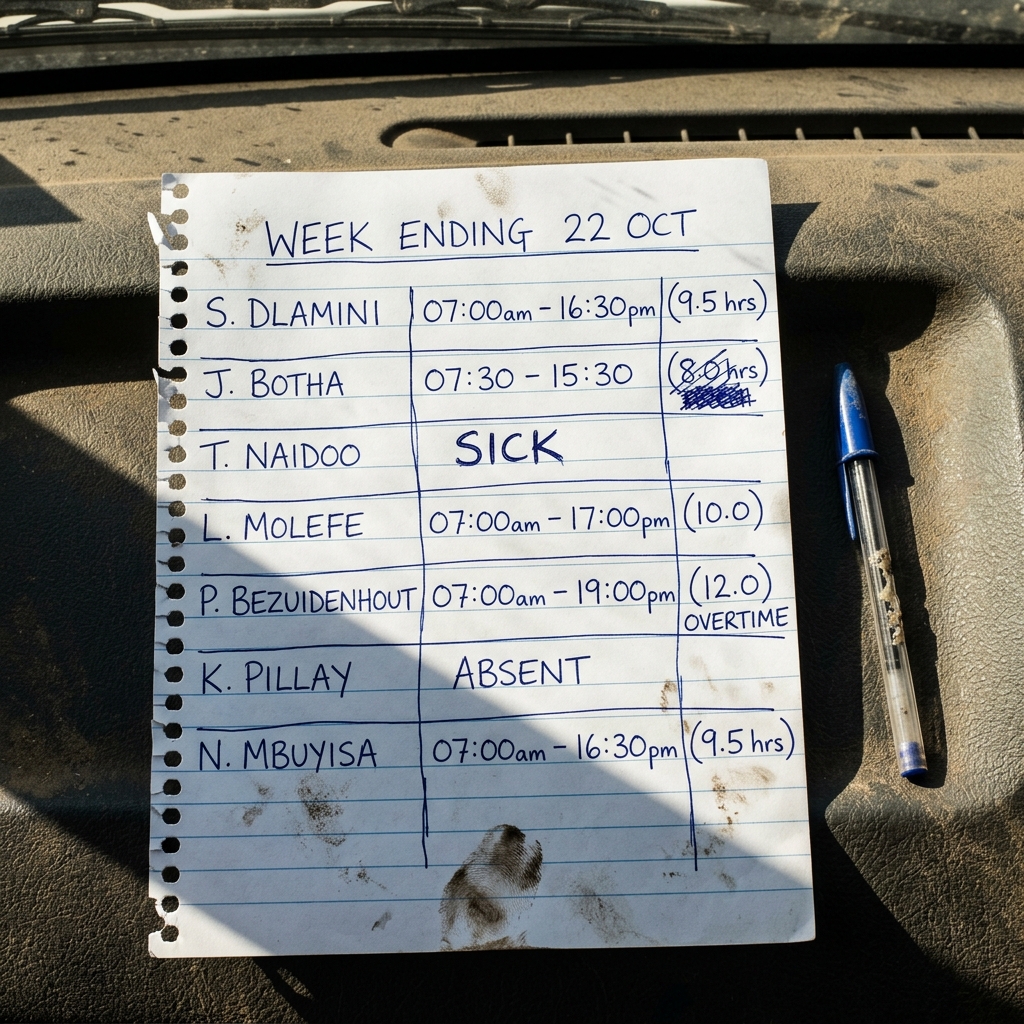
From a photo on a dashboard to a payroll file.

Before
Messy handwritten timesheet photographed on a vehicle dashboard

WhatsApp / uploaded timesheet photo
(messy, handwritten, inconsistent)

→ 2 MINS
After
payroll_export_wk22.csv
Worker ID Name Reg OT
W-8812 S. Dlamini 9.5 0.0
W-8813 J. Botha 8.0 0.0
W-8814 L. Molefe 10.0 0.0
W-8815 P. Bezuidenhout 9.0 3.0
W-8816 N. Mbuyisa 9.5 0.0
W-8817 T. Naidoo — —
⚠ Exceptions caught:
T. Naidoo marked SICK · K. Pillay marked ABSENT
Review required before payroll export.

Clean payroll CSV
(names, hours, totals, formatted)

Send → get the file back before your coffee is cold.

Clean outputs. Every day. Before cutoff.

  • 📊
    Payroll-ready CSV (PaySpace / Sage compatible)
  • 📄
    Daily Site Pack PDF — all submissions + structured records
  • ⚠️
    Exception list: unknown workers, duplicates, missing data
  • 📋
    Full audit log — every edit tracked and timestamped
  • 📈
    Weekly reconciliation summary per site
Important positioning We do not replace your payroll system. We make your inputs usable — before they reach it.
Daily Site Pack — SITE-001 2026-02-28 · 16:58
14
Clean Records
2
Exceptions
Exception Summary
⚠ IllegibleHours — Bongani Zulu — Resolved 16:43
⚠ DuplicateEntry — Sipho Dlamini — Open
⬇ Payroll CSV
📄 Site Pack

Real numbers. Real sites.

A 3-site contractor processing 6,000 submissions per month:

10–20h
Admin hours saved per week
<2%
Target payroll error rate
Same day
Processing before cutoff
Clear
Cost-code allocation per site
Metric Before After
Data capture method Manual re-type Automated OCR
Time to payroll CSV 1–2 days Same day
Error visibility Discovered at payroll run Flagged on intake
Audit trail None / Excel comments Full timestamped log
Admin time per week 20+ hours <3 hours

Built for South African construction payroll requirements

🔒

POPIA-Aligned

Data handling compliant with South Africa's Protection of Personal Information Act.

🛡

Encrypted Storage

All submission data encrypted at rest and in transit.

👥

Role-Based Access

Site managers, payroll admins, and super-admin roles — each sees only what they need.

📅

Data Retention Policy

Pilot data auto-deleted after defined retention period. No surprises.

📋

Defined Liability

Clear boundaries on what we provide. Structured documentation — not payroll certification.

7-Day Pilot

Real submissions. Real results. No commitment beyond the pilot.

1 Site
Up to 60 Workers
Live Submissions
Clear Metrics
  • Full intake pipeline (WhatsApp + upload)
  • Exception dashboard with your real data
  • Payroll CSV in your format (PaySpace or Sage)
  • Daily site pack generated at your cutoff time
  • Success review at day 7
If we don't reduce payroll admin friction, you don't continue. That simple.

Book Your 7-Day Pilot

No commitment required. We'll confirm within 1 business day.
✅

You're booked in.

We'll reach out within 1 business day to confirm your pilot setup and get your first site configured.

Schedule a technical walkthrough →

Common Questions

Do you replace Eco Time or Sage Time? +
No. SiteFlow Ops is not a time-clock or attendance system. We fix messy inputs before they reach your payroll system. We make your data usable — we don't replace anything.
Do workers need to install an app? +
No. Workers and supervisors don't change anything. They continue sending WhatsApp messages or photos exactly as they do now. We receive and process from our end.
Do you verify POPIA compliance? +
No. We are POPIA-aligned in our data handling practices, but we do not certify your business's compliance. We generate structured documentation packs — your legal obligations remain yours.
What payroll systems do you support? +
PaySpace and Sage via configurable CSV export — mapped to your specific field layout. Additional formats are added per request. Direct API integrations are on the Phase 3 roadmap.
What happens to our data after the pilot? +
Pilot data is retained for a defined period (typically 30–60 days) and then automatically deleted. Ongoing clients have a clear data retention policy documented in the service agreement.
What if OCR can't read a form? +
That submission is automatically flagged as an exception and queued in your admin dashboard. Your team resolves it inline — the original image is always shown alongside the extracted data so you can verify and correct.